

It is possible and very easy to remove date from blogger post permalink, follow below step by step guide to do it.
Table of Contents
Is it beneficial to remove date from permalink?
Yes it will be useful as date doesn’t really contribute to Search engine rankings of your blog and makes your blog url lengthier and you know google bots read upto 75 characters of blog permalink, So having permalink without will be beneficial for SEO.
Remove date from post of blogger permalink in easy steps.
To remove date from blogger post permalink and blogspot blogs url, you need to implement one script inside header tags of your blog.
Note:
- This method is not recommended to old blogs who has many post and indexed good in search rank, as it will affect their google pagerank of older post so not recommended for well-established blogs. So use it wisely to maintain your old posts Search ranking.
- Url’s of all posts of your blog will get changed to new one (without date), and old links will get redirected automatically to your new permalink.
- Removing date from blogger post permalink is recommended to new blogs who has 20 posts only, not for well established blogs.
3 easy steps to Remove date from blogger post permalink?
Before.


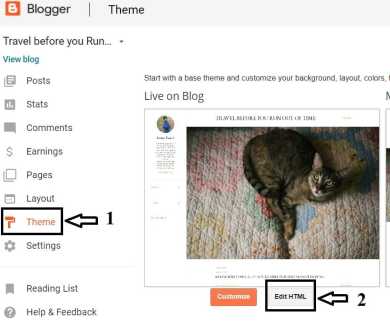
Step -1 – Login to blogger > Go to your blogs Theme setting > then click Edit HTML.

Step 2 – Paste Javascript code given below – after <head> tag, you can find head tag by pressing Ctrl+F as shown in image after this code.
<script type="text/javascript">
//<![CDATA[
// BloggerJS v0.3.1
// Copyright (c) 2017-2018 Kenny Cruz
// Licensed under the MIT License
var urlTotal,nextPageToken,postsDatePrefix=!1,accessOnly=!1,useApiV3=!1,apiKey="",blogId="",postsOrPages=["pages","posts"],jsonIndex=1,secondRequest=!0,feedPriority=0,amp="&"[0];function urlVal(){var e=window.location.pathname,t=e.length;return".html"===e.substring(t-5)?0:t>1?1:2}function urlMod(){var e=window.location.pathname;"p"===e.substring(1,2)?(e=(e=e.substring(e.indexOf("/",1)+1)).substr(0,e.indexOf(".html")),history.replaceState(null,null,"../"+e)):(e=(e=postsDatePrefix?e.substring(1):e.substring(e.indexOf("/",7)+1)).substr(0,e.indexOf(".html")),history.replaceState(null,null,"../../"+e))}function urlSearch(e,t){var n=e+".html";t.forEach(function(e){-1!==e.search(n)&&(window.location=e)})}function urlManager(){var e=urlVal();0===e?accessOnly||urlMod():1===e?getJSON(postsOrPages[feedPriority],1):2===e&&(accessOnly||history.replaceState(null,null,"/"))}function getJSON(e,t){var n=document.createElement("script");if(useApiV3){var o="https://www.googleapis.com/blogger/v3/blogs/"+blogId+"/"+e+"?key="+apiKey+"#maxResults=500#fields=nextPageToken%2Citems(url)#callback=bloggerJSON";nextPageToken&&(o+="#pageToken="+nextPageToken),nextPageToken=void 0}else o=window.location.protocol+"//"+window.location.hostname+"/feeds/"+e+"/default?start-index="+t+"#max-results=150#orderby=published#alt=json-in-script#callback=bloggerJSON";o=o.replace(/#/g,amp),n.type="text/javascript",n.src=o,document.getElementsByTagName("head")[0].appendChild(n)}function bloggerJSON(e){var t=[];if(useApiV3||void 0===urlTotal&&(urlTotal=parseInt(e.feed.openSearch$totalResults.$t)),useApiV3){try{e.items.forEach(function(e,n){t.push(e.url)})}catch(e){}nextPageToken=e.nextPageToken}else try{e.feed.entry.forEach(function(n,o){var r=e.feed.entry[o];r.link.forEach(function(e,n){"alternate"===r.link[n].rel&&t.push(r.link[n].href)})})}catch(e){}urlSearch(window.location.pathname,t),urlTotal>150?(jsonIndex+=150,urlTotal-=150,getJSON(postsOrPages[feedPriority],jsonIndex)):nextPageToken?getJSON(postsOrPages[feedPriority]):secondRequest&&(nextPageToken=void 0,urlTotal=void 0,jsonIndex=1,secondRequest=!1,0===feedPriority?(feedPriority=1,getJSON("posts",1)):1===feedPriority&&(feedPriority=0,getJSON("pages",1)))}function bloggerJS(e){e&&(feedPriority=e),urlManager()}bloggerJS();
//]]>
</script>

Step 3 – Click on save and done, you have successfully removed dates from all permalinks of blogger blog.
Below is Updated url/permalink you can see.


Comment below if you have any queries and need help.
Video tutorial on remove date from blogger post permalinks.

Below are some more tips to improve SEO ranking of your blogger blog free.
SEO Benefits of Table of contents.
Adding Automatic table of contents in blogger will provide summary of your blog posts what its all about, Also TOC links are SEO friendly & can be easily crawled and indexed to search engine pages with direct jump to link included, SO TOC will also help you improve your SEO & in addition increase your search engine rankings. Below is example of how your page look in search engine results. Note: Links in TOC are Do-follow.


Read Details: How to add table of contents in blogger blog?